


Previously Ordered Items for WooCommerce
Transform static order history into a high-converting "Buy Again" portal. Allow returning customers and wholesale buyers to restock past purchases in just one click.
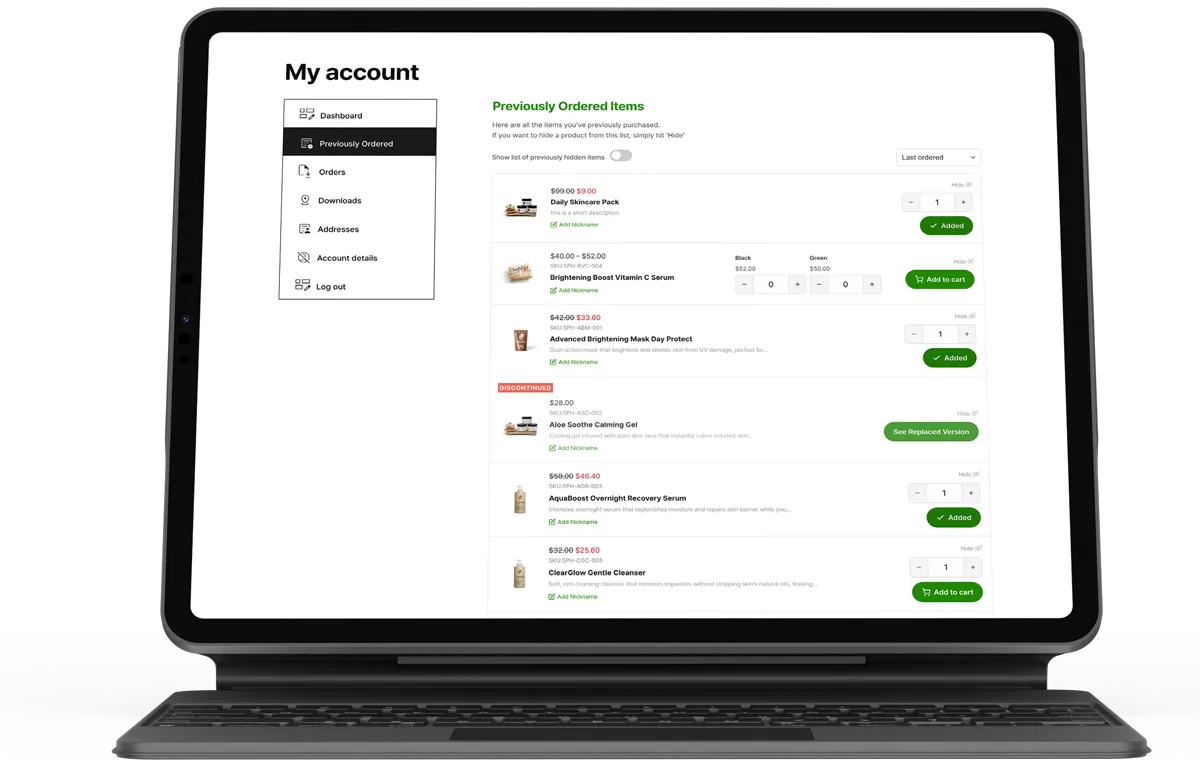
Why Repeat Sales Stall: Default WooCommerce forces customers to dig through old order dates, open past receipts line by line, and search your shop catalog to reorder items they already love. Removing this friction instantly boosts customer lifetime value (LTV) and repurchase frequency.
Turn Order History Into a Shoppable Catalogue
The standard WooCommerce My Account > Orders tab was built as an invoice archive, not a sales engine. It organises history by order numbers and dates, creating massive friction when a customer simply wants to buy a product again.
Previously Ordered Items for WooCommerce solves this by introducing a product-first, personalised purchase catalogue directly inside the customer’s account area. Shoppers see a clean list of every individual item they have ever purchased, complete with thumbnail images, live pricing, stock status, custom quantity selectors, and instant Add to Cart buttons.
Core Features Built for High-Converting Stores
- One-Click “Buy Again” Dashboard: Customers adjust quantities and add single or multiple past purchases straight to their cart without leaving their account dashboard.
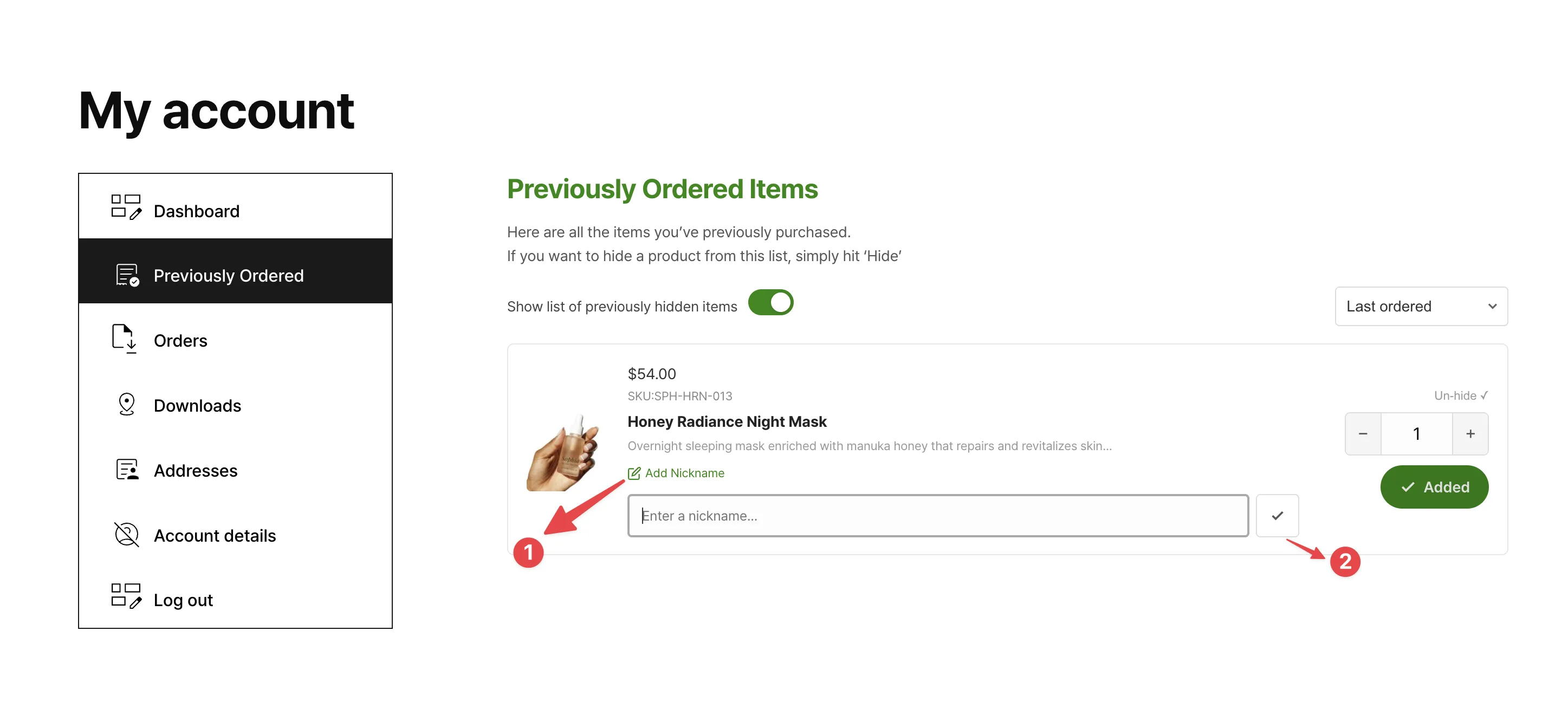
- Custom Product Nicknames: Shoppers can add inline nicknames to any product (e.g., “Office Coffee,” “Store #2 Supplies,” or “Size M Baseline”). Ideal for B2B buyers and variable products.
- Smart Hide & Unhide Controls: Allows customers to clean up seasonal purchases or gift items with a single click. Hidden items are never deleted and can be toggled back into view at any time.
- Auto-Restoration on Reorder: If a customer re-orders an item they previously hid, the plugin automatically moves it back to their main visible reorder list.
- Native Variable Product Support: Variations group logically under parent products with accurate attribute labels (e.g., Size, Color, Flavor) so buyers reorder exact specs without mistakes.
- Customizable Tab & Header Labels: Fully customize the My Account tab name (e.g., “Buy Again,” “Quick Reorder,” “Past Purchases”) directly from WooCommerce settings.
Integrated Discontinued Product Management
When products go out of stock or get delisted, legacy customer links often lead to 404 errors or dead ends. This plugin features a built-in discontinued inventory workflow to preserve your conversion funnel:
Stock-Triggered Delisting
Optionally set products to automatically mark themselves as Discontinued the moment inventory reaches zero.
Alternative Product Links
Attach direct replacement product links and custom CTA buttons to route customers to modern equivalents.
Customizable Notice Banners
Display global or per-product discontinued notification banners with custom text and brand-matched colors.
Can You Build This with Custom Code?
Store owners often ask if they can achieve this experience using a free code snippet added to their theme’s functions.php file. Below is a basic snippet showing how you could programmatically render a raw list of past ordered products:
<?php
// Basic snippet to display simple past ordered items in WooCommerce My Account
add_action( 'woocommerce_account_dashboard', 'my_custom_reorder_list' );

function my_custom_reorder_list() {
    $current_user = wp_get_current_user();
    if ( ! $current_user->ID ) return;

    $customer_orders = get_posts( array(
        'numberposts' => -1,
        'meta_key'    => '_customer_user',
        'meta_value'  => $current_user->ID,
        'post_type'   => 'shop_order',
        'post_status' => array( 'wc-completed' ),
    ) );

    if ( empty( $customer_orders ) ) {
        echo '<p>No past purchases found.</p>';
        return;
    }

    $ordered_products = array();
    foreach ( $customer_orders as $customer_order ) {
        $order = wc_get_order( $customer_order->ID );
        $items = $order->get_items();
        foreach ( $items as $item ) {
            $ordered_products[$item->get_product_id()] = $item->get_name();
        }
    }

    echo '<h3>Reorder Past Purchases</h3><ul>';
    foreach ( $ordered_products as $product_id => $product_name ) {
        echo '<li>' . esc_html( $product_name ) . ' - <a href="?add-to-cart=' . $product_id . '">Add to Cart</a></li>';
    }
    echo '</ul>';
}
?>
The Limitations of Free Custom Code: While the code above outputs a basic list, it creates massive technical trade-offs. It causes severe database bottlenecks on stores with high order volume, fails to handle variation attributes, lacks quantity selectors, offers no UI for hiding items or adding nicknames, and will crash your site if out-of-stock items are added.
Custom Code Snippet vs. Previously Ordered Items Plugin
| Feature & Capability | Custom PHP / Snippet Route | Previously Ordered Items Plugin |
|---|---|---|
| Development Time | 5 to 15+ hours of coding & testing | Instant 2-minute plugin install |
| Variable Product Handling | Requires complex custom queries to fetch variations | Built-in automatic parent/child variation grouping |
| Discontinued Stock Workflows | None (leads to broken add-to-cart errors) | Automated stock triggers, replacement links & banners |
| Database & Site Performance | Slow SQL queries on large order databases | Built-in transient caching for sub-second speeds |
| WooCommerce Compatibility | Breaks during major WooCommerce or HPOS updates | 100% HPOS and Cart/Checkout Block compatible |
| Customer Controls | No hide/restore UI or custom product nicknames | Full user management for hidden items & nicknames |
High Performance & Modern Technical Standards
Engineered for speed, scale, and seamless store integration:
- WooCommerce HPOS Compatible: Fully optimized for High Performance Order Storage to ensure sub-second database lookups.
- Cart & Checkout Block Support: Works seamlessly alongside modern WooCommerce Block checkouts as well as shortcode stores.
- Transient Query Caching: Intelligent caching ensures light server loads even for accounts with thousands of past order lines.
- Zero Admin Bloat: All controls fit cleanly into a dedicated tab inside native WooCommerce > Settings.
- Clean Uninstall: Includes a complete database removal routine that wipes custom settings if uninstalled.
Frequently Asked Questions
Where do customers access their previously ordered products?
A dedicated endpoint appears inside their WooCommerce My Account menu. You can customize the tab name (e.g., “Buy Again”, “Past Purchases”) from your WooCommerce settings panel.
Why not just use a free PHP code snippet from the web?
Free code snippets generally lack basic features like variation grouping, stock-level checks, transient query caching, and user controls (like hiding items or adding nicknames). Worse, unmaintained code snippets frequently break when WooCommerce updates High Performance Order Storage (HPOS) or Cart Blocks.
How does the plugin handle variable products with multiple attributes?
Variations are cleanly grouped under their parent product with exact attribute labels displayed (e.g., Size: Medium, Color: Navy). Shoppers can reorder specific variations without visiting the main single product page.
Does hiding an item delete it from the WooCommerce order database?
No. Hiding an item only removes it from the customer’s personal “Buy Again” list view. Core WooCommerce order receipts and reports are completely untouched. Customers can toggle “Show Hidden Items” and restore any hidden item in one click.
What happens if a product is out of stock or discontinued?
You can enable the built-in Discontinued System to automatically disable purchase buttons when stock reaches zero, show custom notice banners, and provide direct links to alternative replacement products.
Will this slow down my store if customers have hundreds of past orders?
No. The plugin utilizes intelligent transient caching on all item lookups. Queries run once and are cached until an order status changes, keeping dashboard load times fast even for heavy store databases.
Is it compatible with custom WooCommerce themes and page builders?
Yes. It hooks natively into standard WooCommerce My Account templates and works out-of-the-box with popular builders and modern themes like Elementor, Divi, Astra, Kadence, and WoodMart.
What's included
- Complete WordPress plugin files
- Product update and improvements
- HPOS compatibility
- Documentation & setup guide
- Full access to plugin features
- Technical support
- No external libraries. Clean code.
Buy the Plugin
Total(USD) $49.00
Purchase NowChangelog
Version 1.0.1
Released on 2026-07-10FixMini-cart and account page items sync buttons instantly.
UpdateCompatibility with latest WooCommerce & WordPress version
Version 1.0.0
Released on 2026-03-23NewInitial release.
NewPreviously Ordered Items tab in WooCommerce My Account page.
NewOne-click reorder for simple and variable products.
NewCustomer nicknames for previously ordered items.
NewHide / unhide products from the Previously Ordered list.
NewAuto-restore hidden products when re-ordered.
NewDiscontinued product status with custom banner on product page.
NewAuto-discontinue products when stock reaches zero.
NewReplacement product linking for discontinued items.
NewGlobal and per-product discontinued messages.
NewQuick edit support for discontinued status on product list screen.
NewCustomisable accent colour, heading colour, and banner colours.
NewCustom My Account menu label, page heading, and intro text settings.
NewHPOS (High-Performance Order Storage) compatibility.
NewWooCommerce cart and checkout blocks compatibility.
NewTransient-based order data caching with automatic invalidation.