


Daily PDF Sales Report Email for WooCommerce
Automatically generate and email a professional PDF sales report to your inbox every morning. Daily and monthly reports included out of the box.
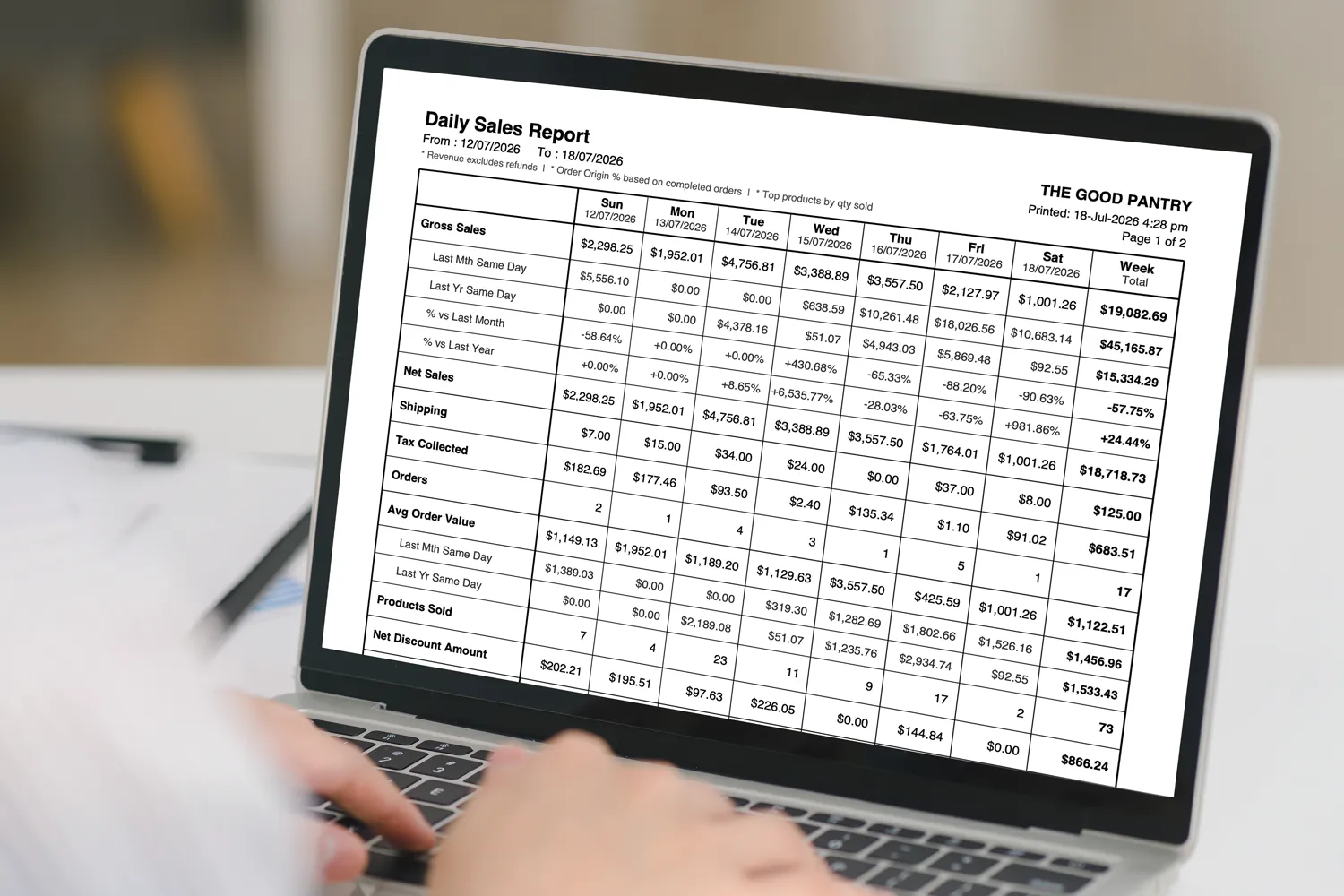
Stop logging in every morning to check yesterday’s numbers. This WooCommerce sales report email plugin builds a detailed, print-ready PDF sales report from your store’s orders and delivers it straight to your inbox, daily and monthly, with every metric that matters. It works on activation, needs no Composer or Dompdf, and is fully compatible with WooCommerce HPOS.
Your numbers should come to you
Most WooCommerce reporting plugins make you do the work: log in, open the analytics dashboard, set a date range, apply filters, and read the numbers off a screen you can’t easily save or share. Do that every morning and it quietly eats a slice of your day.
The other option, a basic sales report email plugin, sends a plain HTML message with a few figures dropped into the body. It’s better than logging in, but there’s nothing to keep. You can’t hand it to your accountant, file it against the month, or print it for a team meeting without copying and pasting.
This WooCommerce sales report plugin takes a different approach. It generates a proper PDF sales report from your own order data and emails it to you on a schedule: a document you can save, forward, print and archive. You get the discipline of a daily review without the daily login, and a permanent record of how the store performed.
A full week of data, delivered every morning
Each morning, a WooCommerce daily sales report lands in your inbox, covering every day of the current week in its own column with a running week total on the right, so you watch the week build day by day. It’s a two-page A4 PDF: page one is the metrics table, page two holds your top products and stock alerts. Key rows carry a same-day comparison against last month and last year, so the numbers always come with context. No cross-referencing an old report or opening a spreadsheet.
Every metric included in the daily report
| Metric | What it shows |
|---|---|
| Gross Sales | With same-day comparisons vs last month and last year, plus the percentage difference. |
| Net Sales | Gross sales after refunds are deducted. |
| Shipping Collected | Total shipping charged across the day’s orders. |
| Tax Collected | Total tax across all counted orders. |
| Orders | Order count for the statuses you choose to include. |
| Average Order Value | With the same last-month and last-year comparisons as gross sales. |
| Products Sold | Total quantity of items sold, not just order count. |
| Net Discount & Discounted Orders | Total coupon discounts applied and how many orders used one. |
| New, Returning & Total Customers | First-time buyers, repeat buyers and the combined total. |
| Refund Amount | Total refunds issued in the period. |
| Order Origin | Where sales came from: Direct, Organic Search, Social, Email, Referral and Paid, as a percentage split. |
| Top Products & Stock Alerts | Best sellers by quantity plus out-of-stock and low-stock warnings (page two). |
Every key number, measured against itself
A sales figure on its own tells you what happened. A sales figure next to the same day last month and the same day last year tells you whether it’s good. This plugin does that comparison for you on the metrics that matter, matching the same weekday in the same week-of-month position for an honest like-for-like read.
- Same day last month: is this week’s Wednesday up or down on last month’s?
- Same day last year: year-on-year growth, with the percentage worked out for you.
- Percentage differences: the plus or minus change shown on the comparison rows, not just raw totals.
- Like-for-like matching: weekday and week-of-month aligned so the comparison is fair.
The month in review, waiting on the 1st
On the first of every month, a second report lands automatically covering the whole month just gone. It uses the same layout as the daily report, but the columns become weeks. You get Week 1 through Week 4, plus a Week 5 when the calendar needs it, with a Month Total on the right.
In one glance you can see which week carried the month, which was slow, and how the month compares to the same month last year. Point it at a separate recipient list and it becomes the summary you send management or your accountant, independently of the day-to-day report.
- Week columns: Week 1 to 4 (and Week 5 when a month runs long) with a Month Total.
- Same metrics as daily: every figure, totalled by week.
- Year-on-year: comparison rows against the same month last year.
- Top products for the month and stock alerts on page two.
- Separate recipients: send it to different people than the daily report, or leave blank to match.
Why a PDF beats an HTML sales report email
Most WooCommerce sales report email plugins send a handful of numbers in the body of an email. That’s fine for a glance, but it isn’t a record. Here’s how a PDF report changes what you can actually do with your data.
| What you can do | This plugin (PDF) | Typical HTML-email plugin |
|---|---|---|
| Save & archive the report | Yes, a real file | No, it lives in your inbox |
| Forward to an accountant | Attach and send | Copy & paste required |
| Print for a meeting | Print-ready A4 | Prints as a web email |
| Metrics per report | 13+ | Often 4 to 5 |
| Same-day year-on-year comparison | Built in | Rarely included |
| Stock alerts | Out-of-stock & low-stock | Usually none |
| Order origin breakdown | 6 channels | Usually none |
| Download any past week on demand | Yes, from the admin | No |
Need last month’s Tuesday? Pull it in seconds
You don’t have to wait for the scheduled email. The Download PDF tab lets you pick any week with a date picker and generate that week’s full report straight to your browser, with no email sent and nothing stored on the server.
It’s the fastest way to retrieve a week you missed, send a specific period to a business partner or investor, or check the report layout before the next scheduled send. You can go back as far as your WooCommerce order history reaches.
- Any week, chosen from a simple date picker in settings.
- Instant download to your browser in seconds.
- Historical reports back to the start of your order history.
- Nothing stored: generated, downloaded, done.
Up and running in under two minutes
Install this WooCommerce report plugin like any other, activate, add your email address, and the first report is scheduled automatically. No external libraries, no Composer, no command line. The settings page sits under WooCommerce in the admin menu, organised into five focused tabs.
| Tab | What it does |
|---|---|
| Turn the daily report on or off, add one or more recipients (comma-separated), and customise the subject and body with placeholder tags like {store_name} and {date}. Send a test report with one click. | |
| Schedule | Set the daily send time (default 4:00am) in your WordPress timezone, and choose whether your reporting week starts on Monday or Sunday. The next scheduled send is shown so you always know when it fires. |
| Report | Choose which order statuses count toward revenue (default: Completed and Processing), set how many top products to include, and set the stock level that triggers a low-stock alert. |
| Monthly Report | Enable the monthly report independently, give it a separate recipient list, and customise its subject and body. Send a monthly test at any time. |
| Download PDF | Pick any week and download that report straight to your browser, with no email sent. Ideal for historical weeks and one-off shares. |
Everything stays on your server
Reports are generated from your own WooCommerce order data on your own hosting. Nothing is sent to an external service and nothing is retained after delivery. The moment an email goes out, the temporary PDF is deleted, and the folder it was written to is protected against direct web access so no one can browse or download a report without going through your inbox.
- PDFs are deleted immediately after each email is sent.
- The temporary folder is secured against direct browser access.
- No data is ever sent to a third-party server.
- Uninstalling removes all settings, scheduled events and temporary files cleanly.
Built for anyone who runs the numbers
- Store owners: start the day already knowing how yesterday and the week are tracking, without opening the dashboard.
- Accountants & bookkeepers: receive a clean monthly PDF on the 1st, ready to file, on its own recipient list.
- Managers & teams: forward or print a shared record for the morning stand-up instead of screenshotting a dashboard.
- Agencies & freelancers: set clients up with an automated report that lands in their inbox, no logins to share.
- Multi-recipient stores: send daily operational data to the team and monthly summaries to the owner or investor.
- Anyone who files by month: download any historical week on demand and keep a permanent, printable archive.
Built properly. No shortcuts.
The PDF is produced by a self-contained PHP generator, so there’s no Dompdf, no Composer step and no external service to depend on. Scheduling runs on WP-Cron in the background, so there’s zero impact on your store’s page speed or the visitor experience.
| Requirement | Details |
|---|---|
| WordPress | 6.0 and above |
| WooCommerce | 7.0 and above |
| PHP | 8.0 and above |
| HPOS | Fully compatible with High Performance Order Storage |
| Dependencies | None required |
| Currency | Automatic, from your WooCommerce settings |
- Timezone-aware scheduling: send times respect your WordPress timezone setting.
- Exact delivery, optional: point a free service like cron-job.org at your WP-Cron URL for precise sending on quiet nights.
- Automatic currency: uses whatever currency WooCommerce is set to, with no configuration.
- Clean uninstall: deleting the plugin removes settings, scheduled events and temporary files.
Frequently asked questions
Does the report arrive as a PDF or an email?
Both. It’s a PDF attached to an email. Unlike plugins that drop a few numbers into the body of an HTML email, this one generates a formatted A4 PDF you can save, print, file or forward to your accountant.
How is this different from other WooCommerce sales report email plugins?
Most WooCommerce sales report email plugins send a plain HTML message with a handful of figures in the body. This one attaches a formatted PDF instead, with 13+ metrics, same-day year-on-year comparisons, stock alerts and an order origin breakdown, so you get a document you can keep and share rather than a glance you scroll past.
Do I need to do anything technical to set it up?
No. Upload the plugin, activate it, enter your email address in the settings and save. The first report arrives the following morning. There are no external libraries, Composer steps or command-line tools involved.
What time does the report arrive?
By default it’s sent at 4:00am in your store’s timezone, and you can change that to any time in the Schedule tab. Because WordPress scheduling is triggered by site visits, on very quiet nights it may arrive a little late. Pointing a free service like cron-job.org at your WP-Cron URL guarantees exact delivery.
Can I send the report to more than one person?
Yes. Enter multiple email addresses separated by commas. The daily and monthly reports each have their own recipient list, so you can send operational data to your team and summary data to management or your accountant.
What does the monthly report show?
It covers the full previous month, broken into week columns with a month total on the right. It includes all the same metrics as the daily report and shows how the month compared to the same month last year. It’s sent automatically on the 1st.
Can I get a report for a past week I missed?
Yes. Use the Download PDF tab, pick any date, and that week’s report downloads instantly to your browser, as far back as your WooCommerce order history goes. No email is sent.
What currency does the report use?
It automatically uses whatever currency is configured in your WooCommerce settings. No setup needed.
Will it slow down my website?
No. The report runs in the background via WP-Cron at your chosen send time and has no effect on page speed or the visitor experience.
Does it work with WooCommerce HPOS?
Yes. The plugin is fully compatible with WooCommerce High Performance Order Storage, the current standard for order management.
Is my sales data sent anywhere?
No. Reports are generated from your own order data on your own server, the temporary PDF is deleted the moment the email is sent, and the folder is protected against direct web access. Nothing goes to a third party.
Start receiving your daily report tomorrow morning
Upload, activate and configure in under two minutes. No technical setup required.
What's included
- Complete WordPress plugin files
- Product update and improvements
- HPOS compatibility
- Documentation & setup guide
- Full access to plugin features
- Technical support
- No external libraries. Clean code.
Buy Daily PDF Sales Report Email Plugin
Total(USD) $69.00
Purchase NowChangelog
Version 1.0.0
Released on 2026-03-10FeatureInitial public release of Daily PDF Sales Report Email for WooCommerce.
FeatureAutomated daily sales report delivered as an A4 PDF straight to your inbox.
OtherSent every morning at a configurable send time, based on your WordPress timezone.
OtherClean, professional A4 portrait layout with a print-ready table design.
FeatureAutomated monthly sales report delivered on the 1st of each month, broken down by week.
OtherWeek 1 through Week 4 columns plus a Month Total column.
OtherComparison against the same month last year.
FeatureDetailed daily metrics in every report.
OtherGross Sales, with Last Month Same Day and Last Year Same Day comparisons.
OtherNet Sales, Shipping, and Tax Collected.
OtherOrders and Average Order Value, each with period-over-period comparisons.
OtherProducts Sold, Net Discount Amount, and Discounted Orders.
OtherNew, Returning, and Total Customers.
OtherRefund Amount.
OtherOrder Origin breakdown — Direct, Organic, Social, Email, Referral, and Paid.
OtherTop Products table, ranked by quantity sold (top 10 by default).
OtherStock Alerts covering out-of-stock and low-stock products.
FeatureMonthly report presents all daily metrics broken down by week, with a month total, a same-month-last-year comparison, top products for the full month, and stock alerts.
NewDownload-on-demand panel — generate and download any week's PDF directly from the admin, without sending an email.
New"Send Test Report" buttons for both the daily and monthly reports, to send the current period immediately to all configured recipients.
NewSeparate recipient lists for the daily and monthly reports, so operations and management can receive different reports. Leave the monthly list blank to reuse the daily recipients.
NewConfigurable plugin settings.
OtherEnable or disable the daily and monthly reports independently.
OtherSet the send time and the day the week starts on.
OtherCustomise the email subject and body for both reports, with a {month} placeholder for the monthly email.
OtherChoose how many top products to list and set the low-stock threshold.
OtherSelect which WooCommerce order statuses are counted toward the totals.
NewDelivery log recording each send with timestamp, report type, success or failure, and recipients.
NewSecurity hardening for generated files.
OtherTemporary PDFs are deleted immediately after sending.
OtherThe temporary folder is protected with .htaccess and index.php to block direct web access.
OtherAdmin AJAX actions (download and test send) are nonce-protected.
DevZero-dependency PDF engine written in pure PHP — no Composer, Dompdf, or external libraries required.
DevAutomatic currency detection from WooCommerce › Settings › General.
DevWP-Cron scheduling with a self-correcting monthly event that recalculates the next 1st-of-month after each run to avoid 30-day drift.
DevDeclares WooCommerce HPOS (High-Performance Order Storage / custom order tables) compatibility.
DevRaises the PHP execution time limit during PDF generation on hosts that permit it.
DevTranslation-ready, with an included .pot file and the "daily-detail-sales-report" text domain.
UpdateDisplays an admin notice and halts loading gracefully when WooCommerce is not active.